



This is a test to see how to add comments to my website. This tutorial also gives the steps that it takes in order to generate email notifications everytime someone leaves a comment on your site. Here are the steps I've followed;
- Go to the Facebook Developer site developers.facebook.com/apps.
- Create an app for your website - I chose use as Facebook login, this gives you an App Id
- Go to the following site developers.facebook.com/docs/reference/plugins/comments/, and create the Facebook comments plugin for your site, selecting the App Id of the App you just created.
- Click generate plugin and you will get a piece of code to place after the opening <body> tag, and there will be a piece of code to include on your page where you want the comments to appear.
- So place this code on your page, it doesn't work locally, but when you place it on your server it will now work
- Add the following code in the head of your html page to specify the userids of the administrators; <meta property="fb:admins" content="{YOUR_FACEBOOK_USER_ID}"/> - for multiple ids separate with a comma without spaces (remember to take out the parenthesis {}).
- To find out your user id go to the following address; https://graph.facebook.com/kevgordon and replace "kevgordon" with your vanity url name
- Add the following code in the head of your html page to specify the app id (that you created earlier); <meta property="fb:app_id" content="{YOUR_APPLICATION_ID}"/> (remember to take out the parenthesis {})
- In order to moderate your comments go to the following url; developers.facebook.com/tools/comments.
- I then developed the feature to email the comment after it was submitted, in order to get this working I used the following page to debug the FB Query Language I used; Run FBQL.
- It took much googling, and a hell of a lot of debugging in chrome, but I managed to get a script together that will email me an alert when a new message is sent; with the email containing the comment/message, the comment id, and the user name. It works in conjunction with a server side script which receives the parameters and then sends the email. Here is the script to go in your page with the FB comments;
<script>


    window.fbAsyncInit = function() {


        FB.Event.subscribe('comment.create', function(response){


            var commentQuery = FB.Data.query("SELECT text, fromid FROM comment WHERE post_fbid=" + response.commentID + " AND object_id IN (SELECT comments_fbid FROM link_stat WHERE url='" + response.href + "')");


            FB.Data.waitOn([commentQuery], function() {

                var commentRow = commentQuery.value[0];

                var imageSrc = 'http://[YOUR_WEBSITE]/php/facebook-notification.php?path=' + response.href.replace('http://','') + '&commentid=' + response.commentID + '&actualid=' + commentRow.fromid + '&commenttext=' + commentRow.text;

                var fromId = commentRow.fromid;


                var commentQuery2 = FB.Data.query("SELECT name FROM user WHERE uid in " + fromId );


                FB.Data.waitOn([commentQuery2], function() {

                    var commentRow2 = commentQuery2.value[0];

                    var dummyImage = new Image;

                    dummyImage.src = imageSrc + "&username=" + commentRow2.name;

                });


            }); // End waitOn commentQuery


        }); // End facebook subscribe


    }; // End windows async


</script>
- In the code above replace the code highlighted in blue with the link to your server side script for sending the email.
- Below is an example PHP file you can use to generate the email:
<?php


$to = 'email-to-send-to@email.com';


$subject = 'www.kevingordon.org.uk New Comment Alert';


$headers = "From: email-to-come-from@email.com\r\n";

$headers .= "MIME-Version: 1.0\r\n";

$headers .= "Content-Type: text/html; charset=ISO-8859-1\r\n";


$message = '<html><body>';

$message .= '<table rules="all" style="border-color: #666;" cellpadding="10">';

$message .= "<tr style='background: #eee;'><td width='100'><strong>Article:</strong> </td><td>http://" . $_GET['path'] . "</td></tr>";

$message .= "<tr><td><strong>Username:</strong> </td><td>" . $_GET['username'] . "</td></tr>";

$message .= "<tr><td><strong>Comment:</strong> </td><td>" . $_GET['commenttext'] . "</td></tr>";

$message .= "<tr><td><strong>Comment Id:</strong> </td><td>" . $_GET['commentid'] . "</td></tr>";

$message .= "<tr><td><strong>Actual Id:</strong> </td><td>" . $_GET['actualid'] . "</td></tr>";

$message .= "</table>";

$message .= "</body></html>";


mail($to, $subject, $message, $headers);


?>
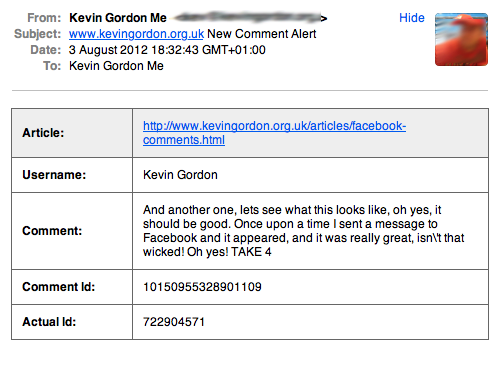
- Please replace the blue text with the appropriate email addresses and web addresses. Note this php outputs a html formatted as follows (with help from this tutorial);
- And then you are done with a Facebook comments notification system, phew!
Please note if you've input the meta tags wrong, you'll get an error under the plugin code under developers.facebook.com/docs/reference/plugins/comments/, for me it said "unreachable", click on that link and it'll give you a break down of errors on your page that your need to correct. (I had left in the parenthesis on the Ids and so the comments weren't coming through to the moderation tool).
Please add comments to help me test out, and let me know what you think. It looks like it works well, only thing is it does not render particularly nicely on the iPad which I will try and resolve. I found that adding the parameter mobile=false to the fb-comments div allows the comments to render well on iPhone and iPad, and I tested posting from them devices and it works.
Please note there is currently a bug in Firefox which means the Facebook plugin is not working in Firefox, please test and let me know if works for you or not in Firefox. The fact it wouldn't remember that I had logged into Facebook gave me a clue - so I googled for Facebook plugin not staying logged in; and it pointed me a the cooke settings. I found that I wasn't allowing 3rd party cookies to be accepted; I re-enabled accepting of 3rd party cookies and Facebook now stays logged in, and the facebook comments now work from Firefox, phew!